
How to Approve Your IPO Mandate on UPI Apps: Step-by-Step Guide

By
Arihant Team
To successfully apply for an IPO, you need to approve the IPO mandate request after you submit your IPO application. Your application will be successful, and you will be eligible only after you approve the payment mandate on your UPI app like PayTM, PhonePe, Google Pay, BHIM, etc.
In This Article
- Introduction
- What is an IPO UPI mandate?
- How to approve your IPO mandate?
- IPO bidding timings and mandate request
- Important things to remember
- Having trouble finding your mandate?
- To sum up
- FAQs
Introduction
Did you know that you cannot just make transfers, pay bills or make purchases through UPI, but can also apply for IPO? Sebi has made the use of UPI payment compulsory for retail investors to apply for an IPO.
The good news is that applying for an IPO using UPI is really simple and convenient. No more filling in lengthy application forms and running to your broker to apply for IPO. You can now make your IPO application completely digitally using your phone and pay for the IPO application through your UPI app like Google Pay, BHIM or Paytm. It takes literally a minute and just your phone!
However, an important part of applying online is - approving the UPI mandate. If you don’t approve your IPO UPI mandate on time, your IPO application gets rejected automatically, even if everything else was done correctly.
Here’s a simple guide to help you understand what a mandate is and how to approve it in just a few taps, so your IPO application goes through without a hitch.
What is an IPO UPI mandate?
Think of IPO UPI mandate as a digital authorisation sent to your UPI app to apply for an IPO.
When you apply for an IPO using UPI, the amount required for the application is blocked in your bank account instead of being transferred immediately. To block this amount, your bank sends a UPI mandate request to your UPI app such as Paytm, Google Pay, PhonePe or BHIM. You must approve the UPI mandate request to ensure your IPO application is successfully placed.
If you don’t approve the mandate before the IPO closes, your application is automatically cancelled. Therefore, as soon as you apply for the IPO, through the ArihantPlus app, make sure to go to your UPI app, tap on the mandate notification, and approve it right away.
What happens with the amount blocked with UPI?
- If you are allotted IPO shares, the amount is deducted.
- If you don’t receive shares, the blocked amount is released back to your account, usually within 1–2 working days after allotment.
- If you receive partial allocation, then the amount equivalent to the allotment is deducted and the balance is refunded back to you.
How to approve your IPO mandate?
Once you have submitted your IPO application through your trading platform, the next step is to open your UPI app, through which you applied to the IPO, and approve the mandate.
The exchange sends you the IPO UPI mandate request through National Payments Corporation of India (NCPI) within 24 hours after the bid is sent to exchange. However, in most cases you receive it almost instantly if you make the application between 10am-5pm.
The process of approving the IPO mandate is almost identical across most UPI apps such as Google Pay, PhonePe, Paytm, BHIM, and banking apps.
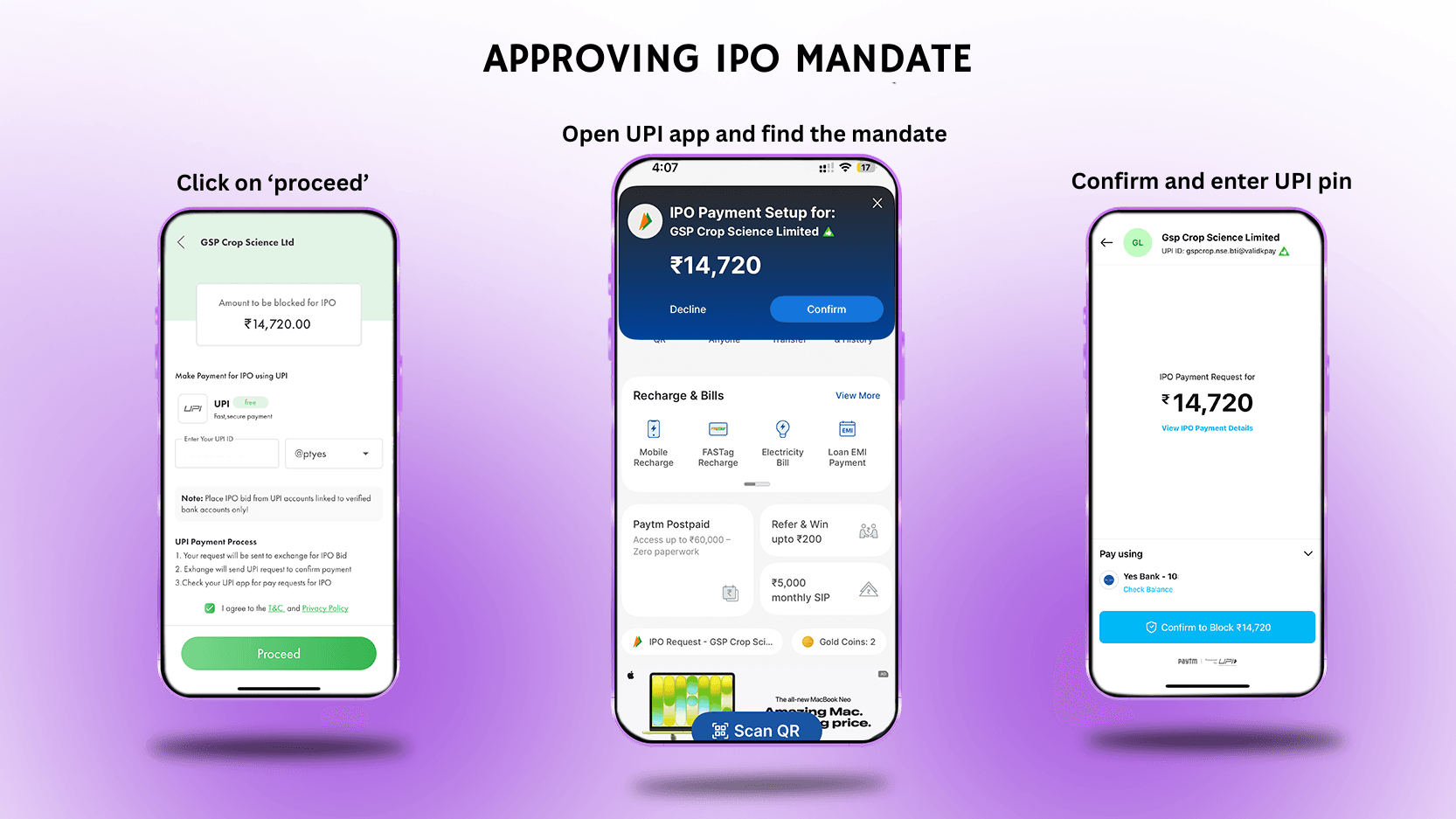
1. Check your notifications or open UPI app
Right after submitting your IPO application, your UPI app usually sends a notification for a pending mandate. Simply tap the notification, and it will take you directly to the approval screen. Even if you don’t receive notification, the moment you open your UPI app you will see a mandate approval card on your payment app.
If you don’t see the notification, don’t worry - you can find it manually. Open your UPI app → on the dashboard, profile or settings section look for:
- Mandates,
- Autopay, or
- IPO mandate CTA
Your pending IPO mandate request should appear there.
2. Check IPO details
Before approving, make sure:
- The amount matches your IPO bid
- The payee is correct
The payee's name will usually include NSE, BSE, KFin Technologies, Link Intime. These are the exchanges or registrars handling the IPO.
3. Confirm and enter UPI pin
Tap on approve/ confirm button and enter your 4 or 6-digit UPI PIN, when prompted, to make the payment.
That’s it. Your bank will now send an SMS confirmation that the IPO amount has been blocked in your account. All you have to do is wait for the allotment day and find out if you received an IPO allotment.
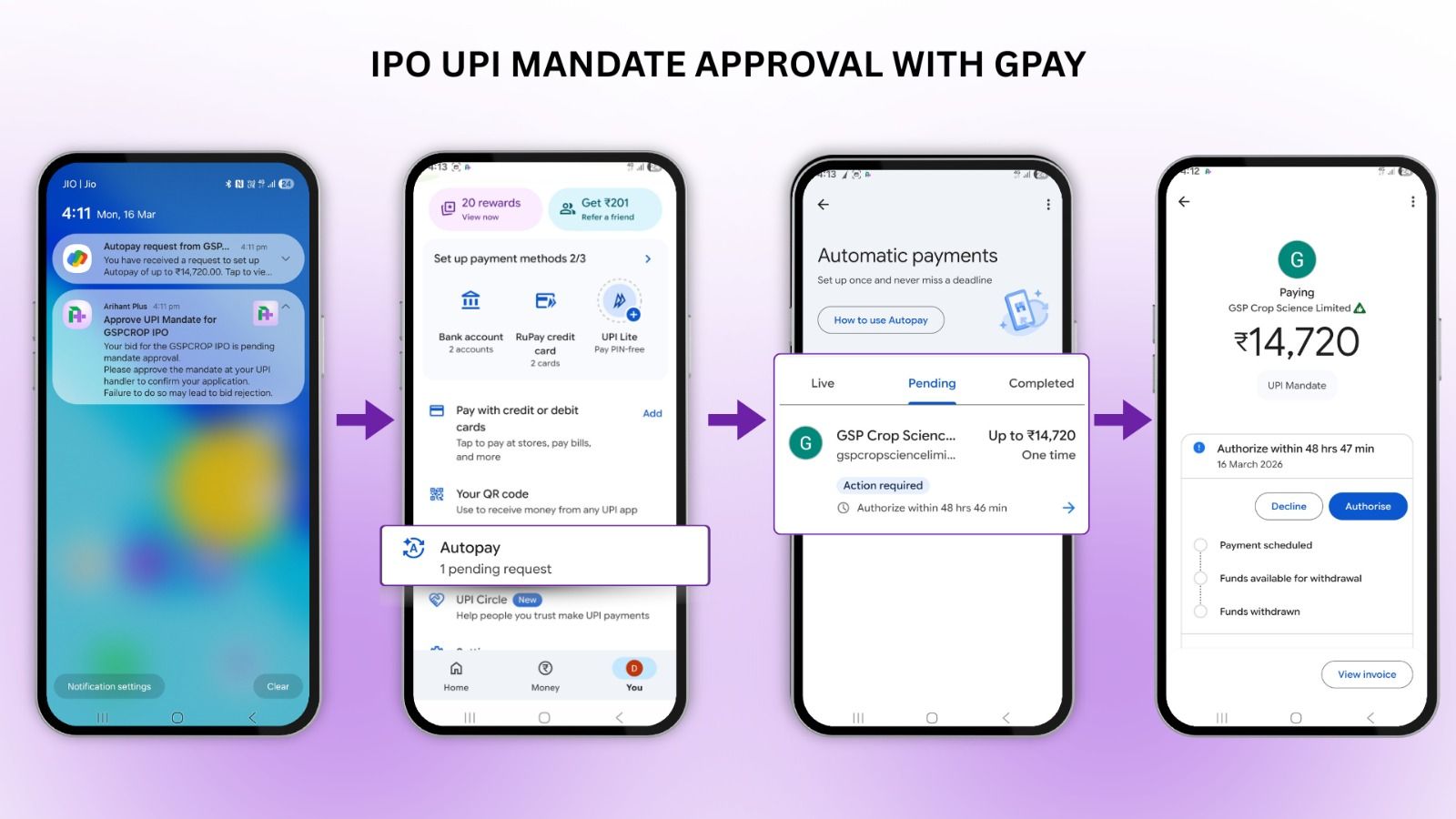
APPROVE IPO UPI MANDATE WITH GOOGLE PAY
IPO bidding timings and mandate request
IPO bidding usually occurs between 10:00am and 5:00pm on working trading days. While you can apply for the IPO using the ArihantPlus app before the IPO opens (pre-apply) or even outside of the bidding window timings, the exchange only processes bids within this timeframe.
So, if you place your IPO application after 5pm, the UPI mandate request will be sent the next day once the IPO window opens at 10:00am. After your application is submitted for bidding process, the National Payments Corporation of India (NPCI) initiates the mandate request, which is then sent to your UPI app for approval. So, make sure to check your UPI app and approve the mandate, to ensure you don’t miss the mandate request.
Open a free account today
Invest in tomorrow with just one click
Important things to remember
- Act promptly: The mandate must be approved before 5 PM on the closing date of the IPO application. However, its a good idea to approve it right after you submit your application. If you miss the 5pm deadline, your application will be rejected, with no exceptions.
- If you applied at cut-off price: If you selected the cut-off price option, the amount blocked will be the upper end of the IPO price band.
- Maintain enough balance: Your account must have at least the full bid amount available. Even a small shortfall can cause the mandate request to fail automatically.
- Keep app updated: Always keep your UPI apps updated to avoid any glitches at the last minute, that can cause your IPO application rejection.
- Wrong UPI pin: If you enter too many wrong UPI pins, your account will be temporarily blocked. Reset the pin through your bank app and try again later.
So, make sure your account has sufficient balance for that amount.
Having trouble finding your mandate?
If you don’t see the mandate request, try these steps:
Check the correct UPI app
Make sure you're checking the same app linked to the UPI ID used in your IPO application. If you entered the wrong UPI ID or have used some other UPI, which is not the same of the app you are on then you will not find the mandate.
Restart your UPI app
Close and reopen the app, then refresh the Mandates/Autopay section.
Wait for a few minutes
Sometimes the request takes 10–15 minutes to appear. Be patient and check back in a while.
Applied after market hours
We place your IPO bid from 10am until 5pm. If you applied for the IPO on your pm outside of this time, you will receive the UPI mandate request after the application bid is placed.
Contact customer support
Reach out to your app’s support team with your IPO application number. You can email upi@npci.org.in with your application number for assistance.
To sum up
IPO application has become really simple thanks to the UPI payment process. However, when applying for an IPO using UPI, don’t forget to check your UPI app and approve the mandate request. It’s a small step, but without it, your IPO application won’t go through.
FAQs
Is money deducted from my bank account once I approve of the mandate?
No, your money stays in your bank account. It is simply blocked and not deducted until allotment. The funds are debited only if you receive IPO shares.
Can I approve the mandate later?
Yes, you can approve any time until 5pm of the IPO closing day. However, it’s best to approve it early to avoid last-minute technical issues.
What happens if I modify my IPO bid?
If you change your bid amount:
- The old mandate is cancelled
- A new mandate request is generated
You’ll need to approve the new mandate again in your UPI app.
Can I approve the mandate from a different UPI app?
No. You must approve it from the same UPI app linked to the UPI ID you used while applying for the IPO.
Can I cancel the mandate after approving?
You can withdraw your IPO application before the issue closes. Contact our customer support team to initiate a withdrawal of your bid, which will cancel the mandate block.
Is it safe to approve a UPI mandate for an IPO?
Yes, as long as you applied through ArihantPlus (or any other SEBI-registered broker) and the beneficiary name matches a known registrar or exchange it is safe. Never approve a mandate you did not initiate yourself.
Do I need to approve UPI mandate if I applied for the IPO through my bank's net banking instead?
If you use your bank's ASBA facility directly (not UPI), there's no mandate to approve. The application amount block happens automatically during application. UPI mandate approval is only required for UPI-based IPO applications.

Related Topics


Rentomojo, Karamtara, LCC - 6 IPO Listings Today: Gains, Losses & Key Highlights


NSE IPO 2026: Price Band, GMP, Financials, Risks and Key Highlights


Kanohar Electricals IPO Review 2026: Risks, Strengths and Financials


Horizon Industrial Parks IPO: Details, Financials, Strengths and Risks



Dhoot Transmission IPO: A ₹3,067 Crore Bet on India's Electric Future































Important IPO terms all investors should understand before investing


Meesho IPO Opens on 3Dec - Is this ₹5,421 crores IPO worth investing?


10 Things to Know About Sudeep Pharma IPO: Date, Price, GMP & Complete Review







Canara Robeco AMC IPO: Should You Apply for MF Giant’s Public Debut?







Smartworks Coworking Spaces Limited IPO: 10 Key Things to Know Before Investing

Travel Food Services Limited IPO: 10 Key Things to Know Before Investing


Ellenbarrie Industrial Gases Limited IPO: 10 Key Things to Know Before Investing



HDB Financial Services Limited IPO: 10 Key Things to Know Before Investing

Sambhv Steel Tubes Limited IPO: 10 Key Things to Know Before Investing

Indogulf Cropsciences Limited IPO: 10 Key Things to Know Before Investing



Prostarm Info Systems Limited IPO: 10 Key Things to Know Before Investing


Aegis Vopak Terminals Ltd IPO: 10 Key Things to Know Before Investing

Schloss Bangalore Limited IPO: 10 Key Things to Know Before Investing


Belrise Industries Limited IPO: 10 Key Things to Know Before Investing


Hexaware’s Billion Dollar Markets Hits in Bear Market: Should You Invest?